Managing Your Child's Activities: One Screen for a Different Schedule Every Day
Piano on Monday, English on Tuesday, swimming on Wednesday, English again on Thursday but 30 minutes later, soccer on Saturday...
Once you have three or four places to be, the times differ from day to day. So you count the weekday in your head, scroll back through the class group chat when you are not sure, and end up asking "what time and where is it today?" several times a day.
This post introduces the weekly timetable in DadaRing. Enter it once and it fills in every week, and exceptions like a cancelled class or a changed time can be fixed for that week only.
A whole week on one screen
The Schedule tab in DadaRing is a weekly timetable laid out as a weekday by time grid. School and class schedules appear as blocks at the right times, and each class has its own color and emoji, so you can tell them apart without reading.
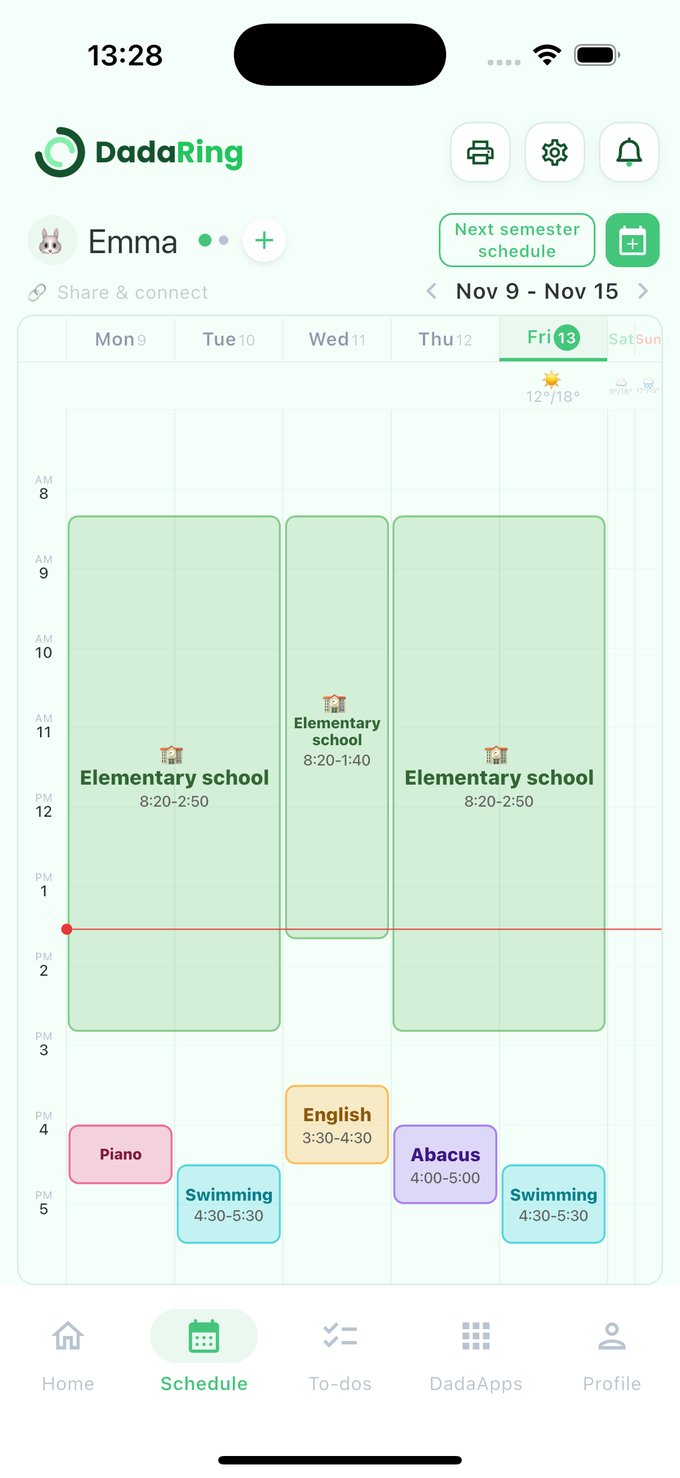
The red line across the screen is the current time. Open the timetable and you see at a glance where you are in the day and what is next. Swipe left or right to check last week or next week.
If you set your area, the timetable also shows the weather for the week. You can see whether it might rain on soccer day on the same screen.
Enter it once, it repeats every week
Class schedules usually repeat on the same weekday every week. So in DadaRing you add a class as a weekly repeat.
- Tap the + button at the top right of the Schedule tab.
- Enter the name of the class and choose the days it repeats and the time.
- Save, and it shows up in that slot from this week onward.
You never re-enter it each week. If you also save the teacher's contact, you can call or message right from the class details when you need to say "we'll be a little late today."
Class cancelled this week? Change only this week
The most annoying part of managing a timetable is the exceptions. Wednesday's class is cancelled just this week, and next Thursday's time moves for a make-up. If you edit the whole repeating class to reflect that, every week after it shifts too.
In DadaRing, when you tap a class block you can choose which one you mean.
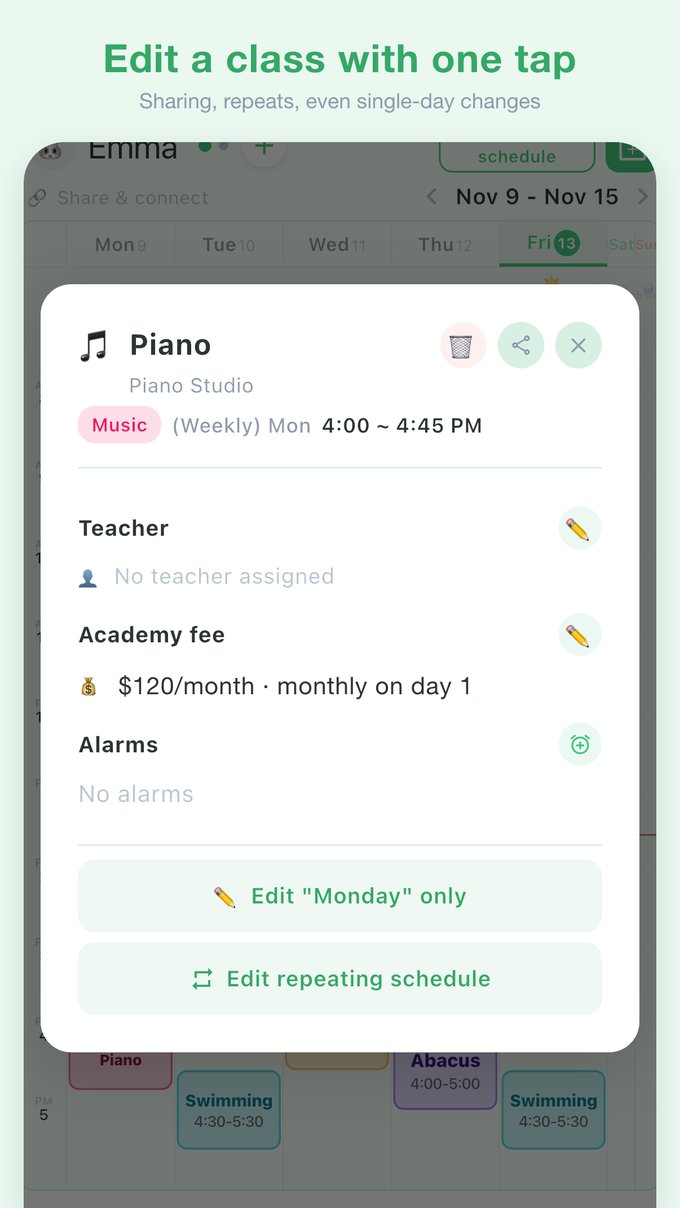
- Edit "Monday" only — cancel that one session or move its time. The following week goes back to normal.
- Edit repeating schedule — for when the class time itself has changed. Everything from now on uses the new time.
A change you made for a single session can be undone with Revert. If a cancellation is called off, just restore the original. You can also add a make-up class for a session your child missed.
Two kids, or a whole family
With more than one child, switch between children at the top of the screen to see each timetable. Your older child's and younger child's schedules never get mixed up.
And you can share the timetable with your spouse or grandparents (family sharing). They see the same timetable, so there is less of "what time is swimming today?" back and forth. On the days Grandma does the pickup, she just looks at the same screen.
What comes along once it is in
Once the timetable is filled in, other screens use that information automatically.
- Home screen widget — today's schedule appears on your home screen without opening the app (home screen widget guide).
- Activity alarms — choose how many minutes before a class starts or ends to be notified, so you never miss a pickup.
- Tuition tracking — connect it to the classes you entered to manage due dates and unpaid bills in one place (tuition tracking).
- To-dos and notices — things to bring pulled from a notice photo are attached to the same date (notice AI).
Getting started
- Add your child in the DadaRing app (just a name and an emoji is enough).
- Open the Schedule tab, tap + at the top right, and enter the name of the class.
- Choose the days and time it repeats, and save.
Start with school (or preschool) to set the rough shape of the day, then layer classes on top and you can see where the free time is. It turns out to be useful when you are wondering whether to add one more activity.
Everything about your child, in one app
DadaRing is an app built for managing your child's classes, tutoring and school schedule. Alongside the timetable, it also covers:
- School notices turned into to-dos from a single photo (notice AI)
- AR reading reports turned into growth charts from a photo (reading progress)
- Tuition due dates and amounts, with reminders (tuition tracking)
Try DadaRing for free
No more counting weekdays. The whole week is on one screen.